Invoices & StatementsUpdated 8 months ago
Invoices are automatically emailed to your AP contact at the time of shipment.
Account statements are automatically emailed to your AP contact on the 1st and 15th of every month.
Please ensure you have [email protected] saved to your safe senders list to prevent our emails from filtering into your junk mail folder.
If you would like to update your AP contact email, please contact [email protected]
To download additional invoice copies from Elastic, please follow these instructions:
- Go to: https://saxx.eIasticsuite.com
- Go to Manage > Orders
- Click on the Invoices tab

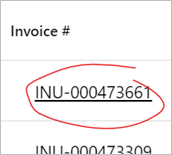
- If your order has been invoiced, the invoice number will be hyperlinked. When you click on it a PDF of your invoice will automatically download. You may need to check your device's Downloads folder.